Work Queues in the Blue Prism environment!
Work queues are like the traffic controllers of your automation kingdom, managing the flow of work items with precision. Let's break it down step by step, shall we? 👇
Work Queues 📥📤
Imagine a work queue as a digital stack of tasks waiting to be completed. Each task, or work item, has some vital attributes:
- 🔑 Key Value: This unique text key helps identify the work item in the queue.
- ⭐ Priority: A numeric value indicating the importance of the task.
- 📈 State: A text-based status reflecting the current condition of the item.
- 🏷️ Tags: Tags provide extra context about the work item.
- 💼 Data: A collection of data associated with the item.
Initially, a work item starts as "Pending." When a process gets hold of it, it's "Locked." Then, the magic happens:
- ✅ Completed: The task is successfully finished.
- ❌ Exceptions: Oops! Something went wrong during processing.
- 🕑 Deferred: Put it on hold; deal with it later.
You can also tweak metadata while working on an item. Change the status, add or remove tags, but remember, the key value is set in stone once created.
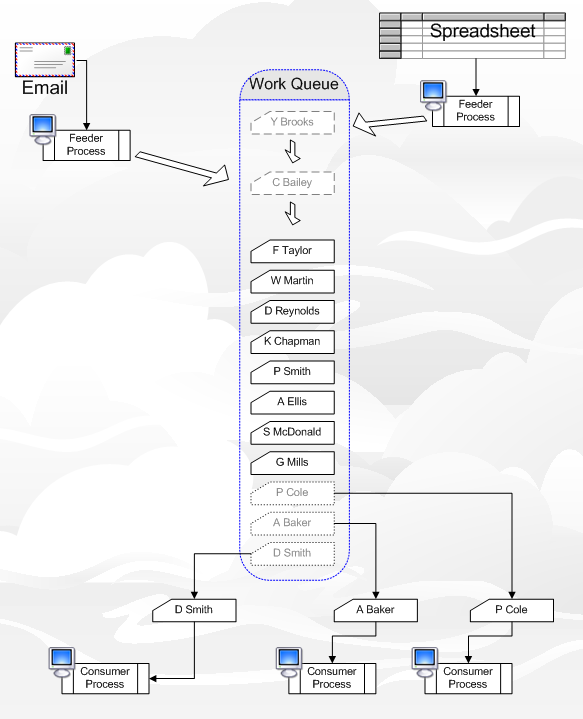
Queues 🧳
A queue holds multiple work items, and they are served to processes based on priority and arrival. Think of it as a queue at your favorite coffee shop.
- ⚖️ Priority Matters: Work items are served by priority first.
- ⏳ Retry Logic: You can set queues to retry exceptions a certain number of times.
- 🔐 Encryption: Protect your data by encrypting queue contents.
Using Queues within Processes 🔄
To put a work item into the queue, use the "Add to Queue" action from the Internal – Work Queues business object. But, here's the catch: only one process or visual business object can work on a queue item at a time. It's like calling dibs!
- 🗂️ Filtering Magic: You can filter items based on their key or specific tags when using the "Get Next" action.
Monitoring Work Queues 📊🔍
Curious about how your queues are doing? Head over to the Queue Management tab of Control Room. It's your dashboard for keeping an eye on your automation's heartbeat.
And there you have it, a glimpse into the world of Work Queues in Blue Prism! 🌐 Keep those robots working efficiently, and your automation kingdom will thrive! 👑
For a deep dive into Work Queues, check out the documentation by clicking on the "Info" icon in the action properties dialog within Process Studio.
Remember, the automation future is bright! Keep learning and automating. 🌟
Got questions or want to share your thoughts? Leave a comment below! 👇😊 #BluePrism #Automation #WorkQueues
.png)




Follow us